Create a Flawless Taxi Receipt Template Instantly
Need a professional taxi receipt template? Learn how to create, customize, and use templates for expense reports, film props, or software testing.
Let’s face it: flimsy, faded paper taxi receipts are a nightmare. They get lost in your wallet, the ink smudges into oblivion, and just when you need one for a critical expense report, it's nowhere to be found. For freelancers, businesses, and even creatives, this isn't just an inconvenience—it's a problem that can cost you real money.
A solid taxi receipt template is the perfect fix. It gives you a clean, professional, and digital proof of your travel expenses every single time.
Why You Need to Ditch Paper for a Digital Taxi Receipt
That crumpled receipt stuffed in a glove box is a major weak link in any modern workflow. Imagine you're a consultant trying to invoice a client for travel costs. If you can't find that receipt, you're eating the cost. Or maybe you're a production assistant on a film set, and you need a prop that looks authentic—a generic, flimsy receipt just won't cut it.
The frustration is universal. Lost slips and illegible handwriting create headaches you just don't need. A professional template solves these issues by creating a clear, verifiable record you can use for anything. It’s less about just replacing paper and more about upgrading to a smarter, more reliable way of keeping track of things.
Keeping Up with a Modern Industry
The move to digital isn't just about convenience; it reflects a huge shift in the taxi industry itself. The global taxi market is exploding and is on track to hit USD 120.90 billion by 2030, a boom driven almost entirely by online booking. As the industry evolves, our methods for tracking expenses have to keep up. You can dive deeper into these numbers in this full taxi market analysis.
A simple slip of thermal paper just doesn’t cut it anymore. Modern expense systems and client expectations demand clear, detailed documentation.
A well-designed digital receipt is your undeniable proof of payment. It protects everyone involved by eliminating guesswork and ensuring every detail—from the base fare to the tip—is captured accurately and ready for any audit, reimbursement, or client bill-back.
The Clear Advantages of a Digital Template
Making the switch to a digital template for your taxi receipts brings some immediate and practical benefits to the table:
- No More Guesswork: Digital templates are always perfectly legible. You'll never have to second-guess a number because of smudged ink or sloppy handwriting.
- Access Anywhere, Anytime: Save your receipts as PDFs or images, toss them in a cloud drive, and pull them up on any device whenever you need them.
- Look More Professional: Submitting a clean, consistently branded receipt to a client or your accounting department shows you’re organized and credible.
- Total Customization: You can tweak every single detail to fit your exact needs, whether you're creating a record for a real business trip or a realistic prop for a creative project.
What Makes a Perfect Taxi Receipt?
A proper taxi receipt is far more than just a number scribbled on a piece of paper. To be truly professional and useful for things like expense reports, it needs to tell the complete story of the trip. Every field has a job to do, building a clear, verifiable record that leaves no room for questions. This is what turns a flimsy slip into a document you can confidently hand over to accounting.
At a bare minimum, the basics have to be there. This includes the taxi company's name and contact info, the driver's name or ID number, and the cab's medallion or vehicle number. Critically, each receipt needs a unique receipt number to prevent duplicates and make every transaction traceable. These details are the foundation of a legitimate receipt.
This is why so many people prefer clear, digital receipts over flimsy paper ones that get lost or damaged.
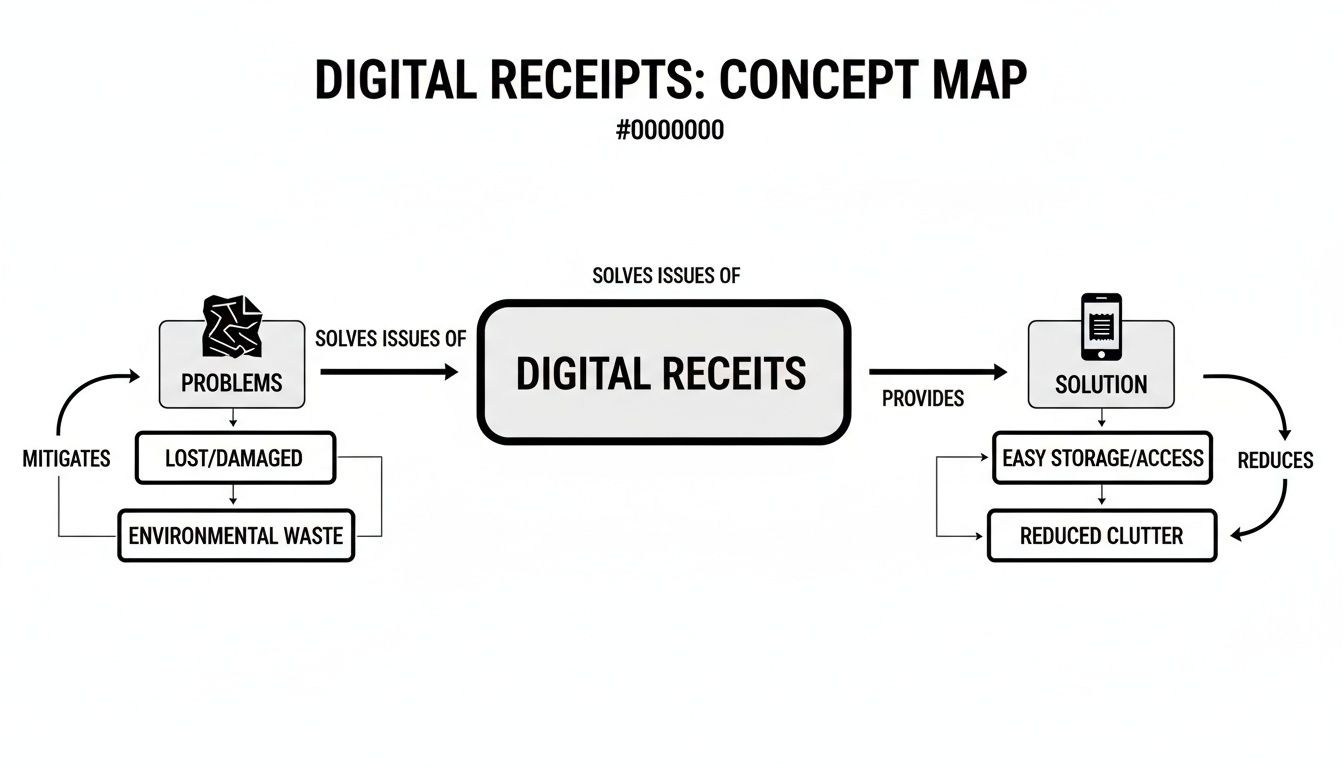
As you can see, a well-structured template brings a level of organization and reliability that old-school methods just can't match.
The Financial Anatomy of a Fare
With the who, what, and where established, the next part is the financial breakdown. This is where you lay out every single charge that makes up the total fare. Transparency is key here.
Let's walk through a common scenario. Imagine a consultant, Sarah, just landed at the airport and needs a detailed receipt to expense the ride back to her client. A proper receipt for her trip would break down the cost like this:
- Base Fare: The flat fee just for getting in the cab (e.g., $3.50).
- Distance Traveled: The per-mile or per-kilometer rate (e.g., 15.2 miles @ $2.50/mile).
- Waiting Time: Any charges for time spent stuck in traffic.
- Tolls and Surcharges: Specific, itemized costs like a bridge toll or an airport pickup fee.
Each of these costs should be listed separately before being added up to a subtotal. From there, you add any taxes and the tip to get the final, grand total. It's worth looking at different examples to see how a taxi receipt format can vary based on local rules and regulations.
Documenting Payment Information
The final piece of the puzzle is recording exactly how the fare was paid. This confirms the transaction is settled and gives accounting all the info they need. Don't be vague.
A complete receipt doesn't just show what was paid, but how. Clearly stating the payment method—whether cash, a specific credit card, or a mobile wallet—is the final step in creating an indisputable financial record for any expense report or audit.
Instead of just putting "Card," a well-designed receipt will specify "Credit Card (Visa **** 1234)." If Sarah paid with her phone, it should say "Apple Pay" or "Google Pay." This simple detail eliminates any ambiguity and makes the receipt a rock-solid piece of documentation that will pass any scrutiny.
Designing Your Custom Taxi Receipt Template
Generic templates are fine in a pinch, but a custom taxi receipt template shows you mean business. It’s the difference between a simple proof-of-purchase and a branded document that’s built for exactly what you need. Using a tool like Receipt Maker, you can go from a blank slate to a perfect receipt in just a few minutes, all without needing any design skills.
The real magic is in getting to fine-tune every little detail. This isn't just about plugging in your information; it’s about making smart choices that make the receipt look authentic and work for your specific situation. Forget trying to make a one-size-fits-all solution work. True customization puts you in the driver's seat, letting you control the layout, branding, and overall feel of the document.
This is more important than ever. Think about it: the taxi industry has changed dramatically, and your receipts need to keep up. With online bookings expected to grab nearly 64% of the market share by 2025, receipts have to be just as modern. They need to clearly break down things like distance, time-based charges, and even split payments. If you’re curious about these trends, you can learn more about the taxi industry's growth on Mordor Intelligence.
Building Your Template From the Ground Up
First things first: let's get your business details on there. This is your opportunity to upload a professional logo, which immediately makes your receipt look legitimate. Right alongside it, you’ll add your company's name, address, and contact info. These are the non-negotiables that build trust with anyone who receives it.
Next, you can start tweaking the financial fields. A good template lets you add or remove line items on the fly. For instance, if you're making a receipt for a ride in a city that has a specific airport tax, you can easily add a custom line for it. On the other hand, for a quick, simple trip, you might hide fields like "Tolls" or "Surcharges" to keep things clean and easy to read.
Here’s a quick sketch of how a taxi company that specializes in airport runs might set up its receipt:
- Header: Your company logo and name, front and center.
- Ride Info: Fields for Driver ID, Cab Number, and a unique Receipt Number.
- Itemized Charges:
- Base Fare
- Mileage Charge
- Airport Surcharge (a custom field)
- Waiting Time
- Payment Breakdown: A clear summary showing the subtotal, tax, tip, and grand total.
Having this level of control means the receipt is a perfect match for the services you actually provided.
Adding Those Authentic Finishing Touches
Beyond just the data, the actual look of your receipt can make a world of difference. This is especially true if you’re creating one for a film prop or just prefer that classic, old-school vibe.
Authenticity is in the details. Something as simple as switching the font from Arial to a thermal printer style instantly makes the receipt look like it came from a real machine. It’s a small change with a massive impact.
Take a look at the kind of customization options you can find in a tool like Receipt Maker. You can see how easy it is to dial in every visual element.

The interface lets you pop in a logo, play with different fonts, and adjust the line items until it’s perfect. You can even add a subtle paper texture to the background so it doesn’t look so sterile and digital. These are the stylistic choices that take a basic template and turn it into something that looks and feels completely professional and believable.
For more inspiration, it's worth checking out other transportation receipt templates to see the range of what's possible.
Getting Your Finished Receipt Ready for the Real World
You’ve designed the perfect taxi receipt template, but the job isn't done until you get it into the right format. How you export or print that final receipt is just as important as the information on it. A crisp PDF for a corporate expense report has very different needs than a realistic-looking slip for a film prop. The goal is to create a final document that looks professional and works perfectly for whatever you need it for.
A good receipt generator should give you more than just a "print" button. It's all about having options to tailor the output, ensuring your documentation always fits the situation. This flexibility is what makes a template genuinely useful day in and day out.
Choosing the Best Format for Your Needs
Hands down, the most versatile and widely accepted format is the PDF. It's the gold standard for business documents because it locks in all your formatting. What you see on your screen is exactly what everyone else will see, no matter what device or operating system they're using.
For something formal like an expense report, your best bet is to export a high-resolution PDF designed for standard letter-sized (8.5" x 11") paper. This gives you a clean, professional-looking document that's easy to print, attach to emails, or upload to accounting software. Your finance department will thank you for the clarity.
But what if you're running a smaller taxi service or need something that feels more authentic? In that case, you can generate a PDF formatted specifically for an 80mm thermal printer. This produces that classic long, narrow receipt that looks like it just came out of a real point-of-sale machine. That little detail can make a huge difference. If you're curious about how different layouts work, it’s worth exploring a free online receipt template to see the options.
Quick Exports for Digital Workflows
Sometimes you don't need a formal document at all. For those moments when you just need quick proof of a transaction, exporting the receipt as an image file—like a PNG or JPEG—is incredibly handy. This is the perfect solution when you need to:
- Fire off proof of payment in an email.
- Send a fare summary over a messaging app.
- Drop the receipt directly into a presentation or report.
Image formats are all about speed and convenience. A PNG is great for high quality and even supports transparent backgrounds. A JPEG, on the other hand, gives you a smaller file size, which is perfect for sharing quickly when pixel-perfect quality isn't the main concern.
Ultimately, picking the right export option is what makes your carefully designed taxi receipt template truly effective. Whether it's a polished PDF for accounting or a quick PNG for an email, matching the format to the task makes your record-keeping look sharp and professional.
Beyond Expenses: Creative Uses for a Taxi Receipt Template
Most people think of a taxi receipt as just another piece of paper to file for an expense report. But if you look a little closer, a good template is surprisingly versatile. I've seen them used in all sorts of creative and practical ways that have absolutely nothing to do with bookkeeping. When you need documentation that looks real but isn't, these templates can be a game-changer.
Think about developers and quality assurance (QA) teams, for instance. If you're building accounting software or a new expense management app, you need a ton of realistic data to test it properly. A flexible receipt template lets them generate hundreds of unique receipts—all with different fares, times, and driver details—to create a solid testing environment without touching anyone's actual data.
Bringing Authenticity to Creative Projects
In film, television, or theater, it's the little things that make a world feel real. This is where a prop master or set designer can really shine, using a taxi receipt template to create props that feel authentic to the time and place of the story.
- Film and TV Production: Picture a character digging through their wallet for an alibi. That crumpled, realistic-looking taxi receipt can be a powerful storytelling moment.
- Theater Props: On stage, having tangible, believable props helps actors sink into their roles and pulls the audience deeper into the world of the play.
Using a template for a prop isn't about fooling anyone; it's about craftsmanship. The ability to tweak details like the font, the logo, and even add a "worn" effect helps build a more immersive and believable world for the viewer.
A Tool for Learning and a Note on Ethics
These templates can even be great for teaching. In a classroom, they're a simple way to introduce financial literacy concepts. You can show students how to read transaction records, calculate totals, and understand the basics of managing a budget with a real-world example.
With travel roaring back, this kind of documentation is everywhere. After a staggering 91.35% collapse in B2B bookings during the pandemic, the taxi market has seen a huge recovery, largely thanks to international tourism. A global taxi industry trends report details this rebound. As more people hit the road for work and fun, knowing how to handle expenses is a crucial life skill.
No matter what you're using it for—software testing, a movie prop, or a classroom lesson—it’s vital to be responsible. These templates are for legitimate record-keeping and creative projects, never for fraud. Using them ethically is what keeps them as valuable tools for all sorts of professionals.
Clearing Up a Few Things About Taxi Receipts
Even after walking through the steps, you might have a few nagging questions. That’s completely normal. Let's tackle some of the most common ones I hear, so you can move forward with confidence.
Is It Actually Legal to Create a Replacement Taxi Receipt?
Yes, it absolutely is—as long as you're honest about it. Creating a replacement receipt for a trip you actually took is a standard business practice. We've all been there: the original gets lost, the ink fades, or it gets crumpled beyond recognition. Using a template to accurately recreate that expense record for your report is perfectly fine. You're simply restoring a lost document, not making something up.
The crucial distinction here is intent. If you create a receipt for a phantom trip that never happened, you've crossed the line into fraud, which is illegal. These tools are built for legitimate uses like expense recreation, testing software, or even as props for a film. Any reputable platform will have strict terms of service that forbid any kind of fraudulent activity.
How Can I Make a Digital Receipt Look Genuinely Authentic?
Authenticity comes down to the small stuff. The most critical element is getting the data right. The fare has to make sense for the distance, the trip times need to be logical, and the taxi company information should be accurate. Without that, nothing else matters.
Once the information is solid, you can focus on the visual details that sell it:
- Choose the Right Font: Ditch the default computer fonts like Arial. A proper thermal printer font instantly gives you that classic dot-matrix look you see on real receipts from a POS machine.
- Think About the "Paper": A stark white background screams "I made this on my computer." Opt for a template that has a subtle, off-white texture or even a slightly crumpled paper effect. It makes a world of difference.
- Mind the Alignment: Real POS systems are precise. Make sure all your columns, text, and numbers are perfectly aligned. A clean, orderly layout is a hallmark of a professionally generated receipt.
Pro Tip: For that final touch of realism, add a barcode or QR code. Even if it’s just a visual element and doesn’t actually scan, it completes the look of a modern, machine-printed receipt.
Can I Use These for International Travel Expenses?
Definitely. A well-designed taxi receipt template is built with global travel in mind. The best ones are flexible, letting you adjust the key details to match the standards of whatever country you were in.
For instance, you can easily change the currency to Euros (€), British Pounds (£), or Japanese Yen (¥). You can also add custom lines for local taxes, like a VAT (Value Added Tax) or GST (Goods and Services Tax), and plug in the correct rates. This ensures your receipt will pass muster for an expense report, no matter where your work takes you.
Ready to create professional, customized receipts in seconds? At Receipt Maker, we provide over 100 templates for every need, from transportation to retail. Get started for free and see how easy it is to make the perfect receipt every time.