How to Organize Receipts for Taxes Without the Headache
Learn how to organize receipts for taxes with a stress-free system. Our guide covers digital tools, smart categorization, and audit-ready tips for anyone.

Let's face it, tax season shouldn't feel like a frantic scavenger hunt through a shoebox stuffed with faded, crumpled papers. The secret to a stress-free system for organizing receipts is actually pretty simple: capture them the moment you get them, categorize them logically, store them digitally, and make sure you have a secure backup.
This simple workflow turns a dreaded annual chore into a manageable daily habit.
Building Your Audit-Proof Foundation
Creating an audit-proof system isn't about buying complicated software; it’s about building consistent habits. When you stop reacting to a pile of receipts at the end of the year and start proactively managing them, you gain incredible peace of mind and, more importantly, maximize your deductions.
A messy system isn't just stressful—it's expensive. According to a report from Thomson Reuters, a staggering 25% of small companies are stuck in "chaotic or reactive" modes when it comes to their tax processes. This disorganization has real consequences. The IRS estimates that poor documentation is behind 20-30% of all disallowed business expenses during an audit each year.
The whole point is to build a reliable digital archive. When tax time rolls around, you should be able to pull a simple report, not go on a desperate search for a gas receipt from last March.
The Four Pillars of Receipt Management
Success really boils down to four core principles. Don't get overwhelmed; just focus on weaving these actions into your regular routine. Each step logically follows the last, creating a bulletproof structure for your financial records.
The best time to organize a receipt is the moment you get it. The second-best time is right now. Putting it off just turns a two-minute task into a weekend-long headache.
This simple table breaks down the essential components of a solid receipt management system.
The Four Pillars of Effective Receipt Organization
| Pillar | Key Action | Why It Matters |
|---|---|---|
| Capture | Digitize receipts immediately using a scanner or app. | Prevents loss, fading, and the dreaded "shoebox" pile-up. |
| Categorize | Assign each receipt to a specific expense category (e.g., "Office Supplies"). | Makes it easy to track spending, identify deductions, and file your taxes accurately. |
| Store | Save digital files in a logical, cloud-based folder structure. | Ensures you can find any receipt in seconds, even years later. |
| Backup | Keep a separate, secure copy of your digital receipt archive. | Protects your critical financial records from data loss, corruption, or hardware failure. |
By mastering these pillars, you’re not just organizing paper; you’re building a powerful financial tool. This is the foundation of smart expense management.
The flowchart below gives you a great visual of how this four-step process works in practice.
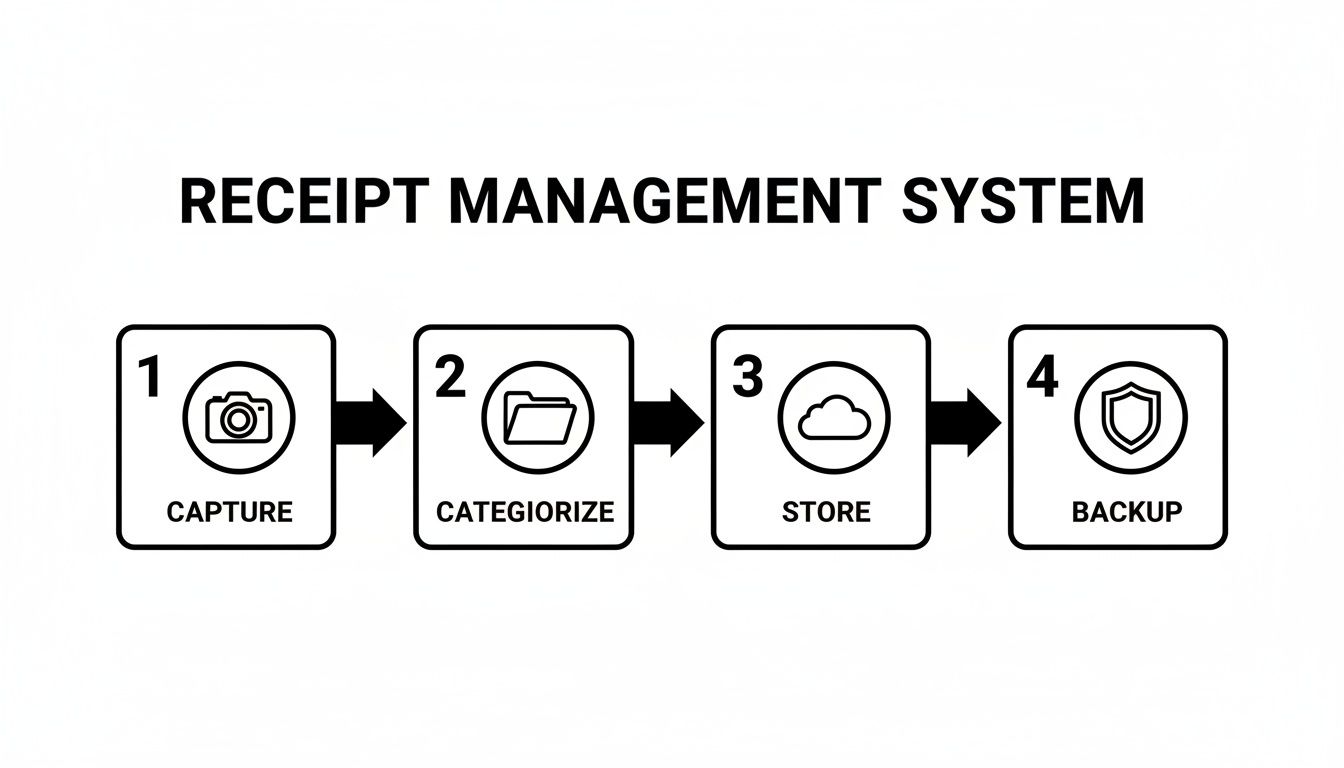
As you can see, it’s a clear, straightforward path from getting the receipt to having a secure, long-term backup. This isn't just about avoiding stress; it’s about building an audit-ready archive from day one.
Designing Your Digital and Physical Filing System
A good system for organizing receipts needs a solid, logical structure, whether you're dealing with stacks of paper or a folder full of PDFs. The whole point is to have a framework so clear that you can find any document you need in a pinch, especially when tax deadlines are breathing down your neck. Let's build out a practical system for both formats that you can actually stick with.
The great news? The IRS has accepted digital receipts since way back in 1997, as long as they are legible and complete copies of the original. This gives you the freedom to go all-digital, stick with paper, or use a hybrid approach that works for you.
Creating Your Digital Folder Hierarchy
When it comes to digital files, a clean folder structure is non-negotiable. Your goal should be to create a path so intuitive you could find a specific receipt from three years ago in under a minute. Think of it as your own personal digital filing cabinet.
One of the most effective structures I've seen is nesting folders by year, then by expense category.
- Top-Level Folder:
Taxes - Second-Level Folders:
2024,2025,2026 - Third-Level Folders: Inside each year's folder, create subfolders for your main expense types, like
Office Supplies,Software,Travel, orClient Meals.
This simple hierarchy stops you from ending up with a chaotic jumble of files dumped in one place. When it's time to do your year-end reporting, figuring out your total software spend for 2025 is as easy as clicking into that folder and checking the contents.
Your file naming convention is just as critical as your folder structure. A poorly named file is as good as lost. A consistent naming scheme makes every single file instantly searchable.
A fantastic format that I always recommend is: YYYY-MM-DD_Vendor_Amount.pdf
So, a receipt for an Adobe subscription on January 15, 2025, would become: 2025-01-15_AdobeCreativeCloud_29.99.pdf. That filename tells you everything you need to know at a glance, without ever having to open the document.
Choosing the Best Physical System
Even if you go digital-first, you'll probably still have some paper receipts to wrangle. For this, the two most common methods are the classic accordion file and the trusty binder. Each one has its own strengths.
Comparing Physical Storage Options
| Method | Pros | Cons |
|---|---|---|
| Accordion File | - Simple and portable - Great for temporary storage before scanning - Easy to quickly file receipts by month or category |
- Can become disorganized if overstuffed - Limited capacity for high volumes - Harder to review multiple receipts at once |
| Binder with Sleeves | - Highly organized and professional - Allows you to see multiple receipts on one page - Easy to add notes or corresponding documents |
- Bulkier and less portable - More time-consuming to set up and file individual slips - Requires purchasing additional supplies like sleeves |
Honestly, for most freelancers and small business owners, an accordion file labeled by month is the perfect starting point. Think of it as a physical "inbox" for receipts before you get a chance to scan them. This simple buffer is a huge part of learning how to organize receipts for taxes, because it stops those little slips of paper from getting lost on your desk or in your car. A binder system is a better fit if you prefer a purely physical archive and need to keep meticulous paper records organized by category.
Sorting Your Expenses to Get Every Possible Deduction
Just stuffing receipts in a shoebox isn't enough. The real magic—and the real savings—happens when you categorize them. This is how you turn a messy pile of paper into a clear roadmap for maximizing your tax deductions. Think of it as telling a story with your finances, one that ends with you owing less to the IRS.
Failing to do this has a real cost. The IRS estimates that small business owners miss out on an average of $5,000 in deductions each year, all because of sloppy record-keeping. You can dig deeper into how corporate taxes work over on the Institute on Taxation and Economic Policy website. Getting organized isn't just about being neat; it’s a core financial strategy.
Start with the IRS-Approved Buckets
The easiest way to start is to use the same categories the IRS uses. If you're a freelancer or sole proprietor, look at the Schedule C form—it's practically a cheat sheet for how you should be sorting your expenses. This makes tax time a simple copy-and-paste job instead of a frantic scavenger hunt.
Here are the essential categories that fit most small businesses:
- Office Supplies: This is more than just pens and paper. It includes software subscriptions, computer gear, and anything else that keeps your office running.
- Travel Expenses: Airfare, hotels, rental cars, and even rideshares when you're on a business trip.
- Meals: Specifically, meals with clients or while traveling for work. Pro tip: scribble who you were with and what you discussed right on the receipt.
- Home Office: If you have a dedicated workspace at home, you can deduct a portion of your rent, utilities, and insurance.
- Advertising & Marketing: Think Facebook ads, business cards, website hosting, and any other costs to get the word out.
Once you've got these basics down, you can add subcategories if it helps. For example, under "Travel," you might create separate folders for "Flights," "Hotels," and "Local Transport." For a deeper dive, our guide on how to track business expenses breaks down even more advanced setups.
Draw a Clear Line Between Business and Personal
This is the golden rule of bookkeeping. The cleanest way to stay out of trouble is to keep your business and personal finances completely separate. That means a dedicated business bank account and a dedicated business credit card. Don't mix them. Ever.
When an expense is a mix of business and personal, you can only deduct the business portion. Documenting that split the moment it happens is your best defense in an audit.
Let's say you buy a new laptop. You use it 80% of the time for work and 20% for watching Netflix. You can only deduct 80% of the laptop's cost. The key is to make a note of that percentage on the receipt right after you buy it. This kind of real-time record-keeping creates a clean, undeniable paper trail that will make your life (and your accountant's) so much easier.
What to Do When You Lose a Receipt
It happens to the best of us. You’ve been diligent, but somehow a key receipt for a legitimate business expense has gone missing. Maybe it was a small cash purchase that never got logged, or a paper receipt that disappeared between your pocket and the scanner. Before you panic, take a breath. You have options.
While you can never, ever invent an expense you didn’t actually incur, the IRS gets it. Perfect documentation isn't always possible. The goal is to rebuild a credible record of the transaction, backed up by whatever other evidence you have. You just need to prove the expense was real, necessary, and for business.
Reconstructing a Lost Receipt the Right Way
First things first, pull together every shred of information you can find about the transaction. Your memory isn’t enough. Your credit card or bank statement is your best friend here—it’s the official record that confirms the date, the vendor, and the amount.
With that information in hand, you can create a substitute record. This doesn’t need to be some elaborate forgery. A simple note attached to your bank statement or a basic document outlining the details will do the trick.
Make sure your reconstructed record includes these five key details:
- Vendor Name and Location: The full name of the business.
- Date of Transaction: The exact day the expense happened.
- Amount Paid: The total cost, including tax and tip.
- Itemized List of Purchases: Get specific. Instead of a vague "Office Supplies," list "1 box of black pens, 2 legal pads, 1 pack of printer paper."
- Business Purpose: Clearly explain why you bought it. For example, "Client lunch with Jane Doe to discuss the marketing proposal" or "New keyboard for the home office computer."
When you pair this detailed reconstruction with your bank statement, you create a solid secondary proof of purchase. Honesty and detail are what matter most here.
An auditor is looking for a credible and consistent story. A detailed, contemporaneous note explaining a lost receipt, backed by a bank statement, is far more convincing than a gap in your records with no explanation at all.
Using Tools and Best Practices
If you want to create a clean, easy-to-read placeholder for your records, using a template can be a huge help. You can find a good free online receipt template to make sure your reconstructed document is organized and has all the necessary fields. This is purely for documenting a real, verifiable expense you already paid for.
This is the most important part: you absolutely must label the document you create.
At the top or bottom of your record, add a clear, unambiguous note like "Recreation of a lost original receipt" or "Substitute proof of purchase." Transparency is everything. This shows an auditor you aren't trying to pull a fast one; you're just doing your best to keep complete and accurate records. That simple act of labeling goes a long way in protecting your credibility.
Keeping Your Records Safe for the Long Haul
Getting your receipt system built is a huge win, but your work isn't quite over once you hit "file" on your tax return. Think of that digital archive as a critical business asset. It needs to be protected from everything—hard drive crashes, corrupted files, or even an accidental click of the delete button.
This is where a solid backup and archiving plan comes in. It's not just a nice-to-have. Globally, tax authorities are cracking down, and for small businesses, flimsy documentation is a massive liability. The IRS disallows roughly 25% of expenses simply because they lack proper proof. That's an expensive oversight a good archive prevents. You can get a sense of these trends from global tax compliance insights by KPMG.
The 3-2-1 Backup Rule: Your Data Insurance Policy
When it comes to protecting data, the gold standard is the 3-2-1 backup rule. It's a surprisingly simple framework that IT pros swear by, and it's perfect for making sure your financial records are safe from just about any disaster.
Here’s the breakdown:
- Three Copies: You need three total copies of your data. That's your live files on your computer plus two separate backups.
- Two Different Media: Store those backups on at least two different types of storage. For instance, your computer’s internal hard drive is one, and an external hard drive is the second.
- One Off-Site Location: Keep at least one of those backup copies in a completely different physical location. Cloud storage is the easiest way to tick this box.
This simple strategy eliminates any single point of failure. If your laptop gives up the ghost, you have the external drive. If a fire or theft claims both your computer and the drive, your cloud backup is safe and sound.
How Long Should You Keep Everything? IRS Retention Rules
So, you've got this beautiful, organized archive. How long are you legally required to hang onto it? The IRS has specific guidelines, and you’ll want to follow them closely. For most people, the key number is three years.
The official rule is to keep records for three years from the date you filed your return or two years from the date you paid the tax, whichever is later.
But—and this is a big but—that timeframe can get longer. If you happen to underreport your income by more than 25%, the IRS has six years to come knocking. If you file a fraudulent return or don't file at all, the clock never stops running.
For this reason, most accountants will give you a simple piece of advice: just keep everything for seven years. It’s the safest bet, covering almost any possible scenario and giving you peace of mind that you're ready for any questions that might pop up down the road.
A great habit to get into is creating a master "archive" folder at the end of each year. Just drag that year's completed receipt folders into it, then create a fresh folder for the new year. It’s a clean and simple annual ritual that keeps your current workspace tidy while ensuring your older records are securely put away but still easy to find.
Common Questions About Organizing Receipts
Even with a rock-solid system in place, you're bound to run into some specific questions when you're sorting out receipts for taxes. It's easy to get bogged down in the details, but the answers are usually more straightforward than they seem. Let's walk through some of the common hurdles freelancers and small business owners face.
Getting these little things right isn't just about compliance; it's about giving yourself the confidence that your records are truly audit-ready.
Can I Actually Use Digital Copies of Receipts for My Taxes?
Yes, you absolutely can. The IRS gave the green light to digital and scanned receipts way back in 1997, as long as they are a complete and accurate copy of the original. This is fantastic news for anyone who's ever found a shoebox full of faded, crinkled paper.
Just make sure your digital version is perfectly clear and captures all the crucial details. A blurry photo won't cut it.
- Vendor name
- Date of the transaction
- An itemized list of what you bought
- The total amount you paid
Honestly, storing receipts digitally is often a much safer bet. You don't have to worry about paper getting lost, damaged in a coffee spill, or fading into a blank slip over time.
What Should I Do If a Receipt Is Faded or Unreadable?
Ah, the dreaded faded thermal receipt. It's a classic problem, and the key is to act fast before the ink completely disappears. The moment you notice one starting to fade, scan it or take a high-quality photo to capture what's left of the information.
If it's already too far gone, don't panic. Find the matching transaction on your credit card or bank statement. Right on the statement (or in a digital note attached to it), write down the specific business purpose for that expense. You could even create a new, legible copy of the receipt, clearly marking it as a "recreation for a faded original," and staple it to the statement.
A faded receipt paired with a bank statement and a contemporaneous note is far stronger proof than a mysterious charge with no context. Your goal is to provide as much supporting evidence as possible.
Taking this extra step shows that you're diligent with your records, which always looks good.
How Should I Track My Cash Expenses?
Cash is tricky. It's the easiest money to spend without a trace and the hardest to prove as a legitimate expense. This is where discipline really pays off. My advice? Get into a strict "no receipt, no reimbursement" mindset, even with yourself. Always ask for a receipt, no matter how small the purchase.
If a vendor genuinely can't give you one (like at a flea market or a small cash-only stand), you need to document it yourself, right then and there. Pull out a notebook or open a notes app on your phone and log the details immediately:
- Date and Time
- Amount Paid
- Vendor or Seller Name
- Specific Business Purpose
This habit of creating a log as it happens is what makes your cash spending legitimate in the eyes of an auditor.
How Detailed Do My Receipt Categories Need to Be?
You don't need to reinvent the wheel here. The best approach is to simply align your categories with the expense categories you'll see on your tax forms, like the Schedule C for sole proprietors.
Start with the basics: "Office Supplies," "Travel," "Meals," "Software," and "Utilities." This makes transferring your year-end totals directly to your tax return a breeze. If you want more detail for your own analysis, you can always add subcategories (like "Travel > Airfare" and "Travel > Hotels"), but make sure your main categories mirror what the IRS is looking for.
When you need to reconstruct a lost receipt or create professional expense documentation, Receipt Maker offers a simple and effective solution. Create accurate, customized receipts for your records in just a few clicks. Learn more and get started for free at ReceiptMakr.com.