How to Organize Business Receipts for Stress-Free Finances
Learn how to organize business receipts with our guide. Discover digital systems, automate workflows, and make tax time easier for your small business.

A good system for organizing business receipts is all about consistency. It's a simple, repeatable process to capture, digitize, and file every single proof of purchase. The best way I’ve found is to use a digital app or even just your phone's camera and cloud storage. Snap a photo right away, give it a logical name, and drop it into a categorized folder. That's it. Do that every time, and you'll be golden when tax season rolls around.
Why You Need to Organize Business Receipts
Let's be honest, that shoebox overflowing with crumpled receipts isn't just a mess—it's a liability. The real cost of disorganization hits you in the form of missed tax deductions, stressful audit preparations, and completely skewed financial reports. When you don't have a clear system, you're just guessing where your money is going, and that guesswork can hold your business back and create a ton of unnecessary stress.
Shifting from Paper Chaos to Digital Clarity
The good news? There's a much better way. Making the leap from paper chaos to a streamlined digital system is one of the smartest moves any business owner can make today. This isn’t just about being neat; it’s about setting a solid foundation for your business's financial health.
Think about what a digital system gives you:
- Financial Accuracy: You’ll know exactly what you’re spending and where. This makes budgeting and forecasting so much easier and more effective.
- Faster Reimbursements: No more waiting. You can get money back to your employees (or yourself) in a snap with clear, documented proof of every expense.
- Audit-Proof Records: Imagine having every receipt, invoice, and document ready and searchable at a moment's notice. A potential audit becomes a minor task, not a major crisis.
This isn't just a trend; it's a fundamental shift in how business is done. The Digital Receipts Market was valued at $1.732 billion and is expected to hit $9.145 billion by 2035. Businesses are jumping on board because they want to cut waste and work smarter. I've seen small business owners report 20-40% faster bookkeeping after going digital, which frees up so much time to actually focus on growing the company.
A well-organized receipt system is your financial command center. It gives you the hard data you need to make smart decisions, maximize every possible deduction, and stay compliant without the headache.
You can finally ditch that year-end panic. By putting a simple, sustainable process in place now, you'll get your business finances under control for good. For a deeper dive into preparing for tax season, check out our guide on how to organize receipts for taxes. The rest of this guide will walk you through the practical steps to make it happen.
Designing Your Digital Receipt System
Let's be honest, nobody enjoys dealing with a shoebox full of crumpled receipts. The good news is that building a digital system to tame the paper monster isn't nearly as hard as it sounds. The whole point is to create a simple, repeatable process that quickly becomes second nature.
Get the foundation right, and you'll never have a pile of receipts staring you down again. What was once a dreaded chore can become a quick, even satisfying, daily or weekly task. A solid system needs just three things: a single place to put all incoming receipts, a way to scan paper ones from anywhere, and a plan for how it all talks to your bookkeeping software.
Choosing Your Core Tools
First things first: you need to decide on a "home base" for all your digital receipts. There isn't a magical, one-size-fits-all answer here. The best tool is simply the one you'll actually use consistently.
Dedicated Expense Apps: Tools like Expensify or Dext are the heavy lifters. They're built for this. You snap a picture, and their scanning tech (called OCR) automatically pulls out the vendor, date, and amount. Most of these sync directly with accounting software, which is a lifesaver if you have employees or a lot of transactions.
Cloud Storage: Don't overlook the simple stuff. A well-organized folder system in Google Drive, Dropbox, or OneDrive can work beautifully, especially for freelancers and small businesses. Just create a main "Receipts" folder, then break it down by year and month (e.g.,
Receipts > 2024 > 01-Jan). It's manual, but it’s clean and probably free.
The trick is to pick one and commit. Bouncing between different apps or folders is a recipe for chaos and defeats the whole purpose of having a system in the first place.
Handling Lost or Faded Receipts
Even the most organized person loses a receipt now and then. And we've all seen those thermal paper receipts that fade to blank yellow rectangles in a few months. It happens. But a missing receipt shouldn't mean a lost tax deduction.
This is exactly when a tool like Receipt Maker can save the day. When the original is gone for good, but you have the transaction on your bank or credit card statement, you need a way to document the expense for your records.
For example, imagine you can't find the receipt for a $150 client dinner. You can see the charge on your Amex statement—it shows the date, restaurant name, and total. Using that information, you can generate a clean, standardized replacement receipt that accurately reflects the purchase. This fills the gap and ensures every legitimate expense is accounted for.
A truly effective system has a plan for when things go wrong. Having a reliable way to handle lost receipts means no deduction is ever truly lost—you just need to properly recreate the documentation from data you already have.
This gives you a crucial backstop. It ensures your financial records are always complete, which makes monthly reconciliations and tax time infinitely less stressful. A system is only as strong as its ability to handle the messy, real-world problems that inevitably pop up.
A Sustainable Workflow for Daily and Monthly Receipt Management
Let's be honest: the perfect digital system is useless if you don't actually use it. After you’ve set up your tools and folders, the real secret to staying organized comes down to building a simple, repeatable workflow. The goal is to make managing receipts a background task—something so quick and easy it becomes second nature, not a dreaded chore.
This entire process hinges on two core habits: a quick daily action to stop receipts from piling up and a more thorough monthly check-in to make sure everything is accurate. Once you get into this rhythm, you'll find that organizing business receipts transforms from a chaotic mess into a smooth, continuous process.
The Five-Minute End-of-Day Sweep
The single best way to avoid losing receipts is to deal with them right away. I call this the "end-of-day sweep," and it's a small habit that pays off big time. Before you pack up for the day, take just five minutes to process any receipts you collected.
- For paper receipts: Pull out your phone and scan them immediately with your chosen app.
- For digital receipts: Forward any email receipts to your dedicated inbox or drag the PDF right into your "Incoming Receipts" folder.
The mantra here is capture now, categorize later. Don't get bogged down with perfect filing at this stage. Just get everything digitized and into one central holding pen. This simple act is what prevents that all-too-familiar panic of finding a faded, crumpled receipt in a coat pocket weeks after a purchase.
A consistent daily capture routine is your most powerful defense against lost receipts and missed deductions. It honestly takes less time than making a cup of coffee but saves you hours of frantic searching later.
This simple diagram breaks down the fundamental flow: you capture the receipt, store it in your digital system, and then integrate it with your bookkeeping. It all starts with that first step.
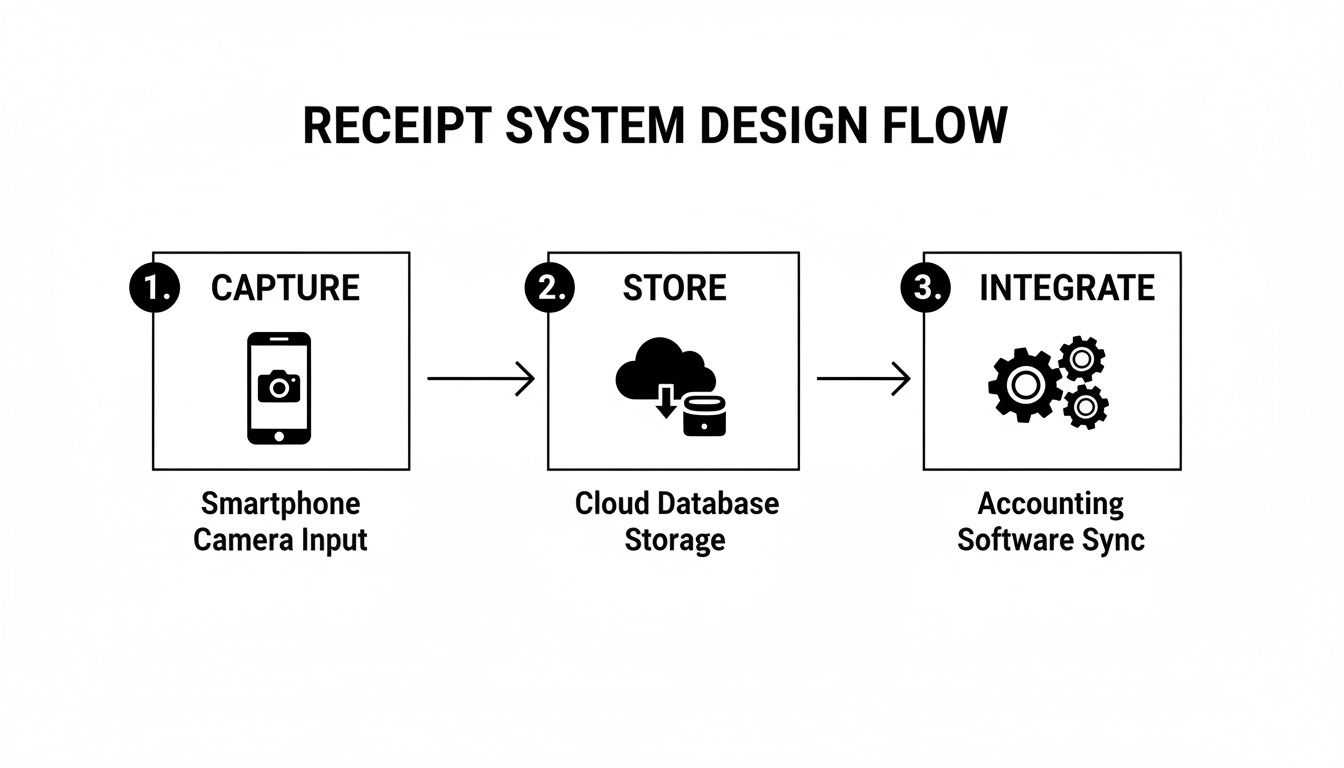
As the infographic shows, the process kicks off with immediate capture, which is the cornerstone of an effective daily workflow.
Your Monthly Reconciliation Checklist
Once a month—maybe the first Friday of the new month—set aside about an hour for a financial check-in. This is where you bring everything together, making sure your records are spot-on and ready for your bookkeeper or accountant. Think of it as balancing your business checkbook, but for all your expenses.
Your monthly reconciliation should look something like this:
- Empty Your "Incoming" Folder: Go through every single receipt you captured during the month. Rename each file using your naming convention and move it to its final destination (e.g.,
Receipts > 2024 > 10-Oct > Marketing). - Match Receipts to Statements: Pull up your business bank and credit card statements for the month. Go line by line, matching each transaction to a corresponding digital receipt in your folders. This is a non-negotiable step for catching bank errors, spotting fraudulent charges, or identifying missing receipts you need to track down.
- Categorize Everything: As you reconcile, make sure every expense is properly categorized (e.g., Office Supplies, Travel, Software). Getting this right makes generating profit and loss statements a breeze and radically simplifies tax prep. For a deeper dive on this, our guide on how to track business expenses covers effective categorization methods in more detail.
- Create an Expense Summary: Finally, generate a quick expense report for the month. Most accounting software does this for you, but even a basic spreadsheet can give you a powerful snapshot of where your money is going. This is the kind of insight that helps you make smarter budget decisions next month.
Receipt Management for Mobile Professionals
Being constantly on the move for work—whether you're at client sites or in transit—throws a real wrench into traditional receipt management. When your office is a car, an airport lounge, or a coffee shop, you need a system that's as mobile as you are. For professionals who live out of a suitcase, organizing business receipts isn't just good bookkeeping; it's the only way to make sure you get every dollar you're owed and can bill your clients accurately.

The whole process has to be fast, reliable, and just part of your daily routine. The real secret is to capture expenses the moment they happen. Don't wait. That hotel folio will get lost in your luggage, and that lunch receipt will fade in your wallet. A simple, immediate action saves you from financial leaks and a mountain of administrative pain later on.
Strategies for the Frequent Traveler
If you're constantly on the road, juggling receipts for flights, rental cars, hotels, and meals is a non-negotiable part of the job. You need them for reimbursements and tax deductions, period. In the world of business travel, where global spending is on track to hit a record $1.57 trillion, disorganization is just plain expensive. Industry audits I've seen show that sloppy receipt management can lead to 20-30% in reimbursement leakage—money you're just leaving on the table. You can dig into the numbers by exploring the latest global business travel spending forecasts.
The best habit you can build is to deal with receipts right after the transaction. As soon as you pay for that taxi or check out of the hotel, take a minute to digitize the proof of purchase.
Here’s a simple travel workflow that actually works in the real world:
- Create a "Travel" Category: In whatever digital system you use, make a dedicated folder for each business trip. Something like
"NYC Conference - Oct 2024"is perfect. - Scan Instantly: Use a mobile scanning app to grab a clear picture of every paper receipt. This creates a digital backup before the original has a chance to disappear or get ruined.
- Standardize When Needed: What if you get a non-itemized summary, or you lose a receipt for a cash purchase like parking? This is where a tool with templates for rideshare or hotel expenses comes in handy. You can create a standardized record that matches your credit card statement, ensuring every single expense is documented consistently.
A dedicated mobile system turns chaos into order. By capturing every expense as it occurs, you transform the painful task of compiling an expense report into a simple process of reviewing records you've already saved.
Tying Expenses to Client Projects
For consultants, designers, freelance developers, and anyone in a service-based role, tracking expenses goes beyond your own books—it's essential for client billing. Every cost, from printing a presentation to buying software for a specific project, has to be tied directly to the right client. This is absolutely critical for accurate job costing and transparent invoicing.
Without a solid system to link expenses to projects, you’ll either end up eating costs that should have been billable or, worse, overcharging a client. Both outcomes are terrible for your profitability and your reputation.
To handle this, just adapt your digital filing system. It's not complicated:
- Project-Based Folders: Instead of organizing by month, set up a main folder for each client, then create subfolders for their individual projects (e.g.,
Clients > Client A > Project Phoenix). - Tagging and Naming: As you scan and save a receipt, make sure the client or project name is right there in the filename. Think
2024-10-28_ClientA_Phoenix_Software.pdf. - Invoice with Confidence: When it's time to bill, you can just pull all the receipts from that project folder, attach them to your invoice, and give your client complete, undeniable proof of every pass-through cost.
This approach ensures every single billable expense is documented, justified, and recovered without a fight. It’s a simple way to build trust with your clients and protect your bottom line.
Staying Compliant and Audit-Ready
Let's be honest: nobody enjoys thinking about a tax audit. But having a rock-solid system for your business receipts can turn that potential nightmare into a simple, non-eventful file request. This isn't just about tidy bookkeeping; it's your front-line defense, providing both peace of mind and real financial protection.
This is more important than you might think. With service industries booming, the IRS is paying close attention. Poor receipt management costs U.S. small businesses an estimated $10-20 billion a year in penalties alone. A smart, digital-first approach can slash errors by up to 50% and make you audit-ready from day one. It’s about turning those paper scraps into profit protectors. As you can see from global revenue statistics, tax agencies worldwide depend on receipt data, making their accuracy absolutely critical.
Know Your Retention Rules
First things first, you need to know how long to hang onto everything. The IRS has some very clear guidelines, and you’ll want to follow them to the letter.
A good rule of thumb is to keep most business records for three years from the date you filed your tax return.
However, there are a few key exceptions that extend that timeline:
- Six Years: If you happen to underreport your income by more than 25%, the look-back period doubles to six years.
- Seven Years: For records related to claiming a loss from worthless securities or a bad debt deduction, you'll need to keep them for seven years.
- Indefinitely: Some records should never be thrown away. This includes things like property deeds and all your employment tax records.
This is where a digital system really shines. Long-term storage becomes practically free and effortless, freeing you from dusty file cabinets and storage unit fees.
What Makes a Receipt "Valid"?
Not every scrap of paper counts as proof. For a receipt to hold up under scrutiny, it needs to have specific, non-negotiable details. An auditor is trained to look for these key pieces of information to verify your expenses are legitimate.
An incomplete or blurry receipt is almost as bad as a missing one. When you digitize, make sure your copies are crystal clear and contain all the required information.
Every receipt you save needs to be legible and include these five things:
- The vendor's name (who you paid)
- The transaction date
- A clear description of what you bought
- The total amount paid
- The payment method used
Having all this organized in a searchable digital archive is where your hard work pays off. And if you ever lose an original but still have the transaction details from a bank statement, you can learn more about creating accurate copies of receipts for your records to ensure your files are always complete and compliant.
Got Questions About Business Receipts? We’ve Got Answers.
Even with the best system, you're bound to have questions. Switching up how you handle receipts can feel like a big project, and a few lingering uncertainties can be enough to stop you in your tracks. Let's clear up some of the most common questions so you can feel confident putting your new workflow into action.
My goal here is to tackle those nagging doubts head-on. A perfectly organized system isn't some far-off dream—it's totally achievable, and these final tips will help get you there.
Are Digital Copies of Receipts Actually Legit for the IRS?
Yes, they absolutely are. For years now, the IRS has given the green light to digital and scanned receipts, but there's a catch: they have to meet a few key standards. The digital copy must be a clear, accurate, and complete version of the original paper receipt.
This is exactly why the quality of your scan matters so much. Whether you're using a dedicated scanner or just the camera on your phone, the end result has to be legible. If an auditor ever comes knocking, you need to be able to pull up a readable copy of that expense. Storing everything in a secure, organized cloud drive is one of the easiest ways to make sure you’re always compliant.
Don't let compliance fears keep you chained to piles of paper. As long as it’s complete and legible, a clean digital copy carries the same legal weight as the original. Making this switch is a huge step toward modernizing how you manage your finances.
By going digital, you’re not just saving space. You’re also giving yourself the power to back up your records and protect them from fires, floods, or just plain getting lost.
What Happens If I Lose a Receipt?
It’s happened to all of us. Losing a receipt is a pain, but it doesn’t automatically mean you have to kiss that tax deduction goodbye. The first thing you should always do is reach out to the vendor and ask for a duplicate. For larger purchases, most businesses can pull up your transaction and email you a copy in minutes.
If you can't get a duplicate, you still have options. You can often use other evidence, like a bank or credit card statement that clearly shows the vendor's name, the date, and the exact amount of the transaction. For your own bookkeeping, creating a replacement receipt that matches those details is a smart move. This keeps your internal files complete and ensures everything lines up perfectly with your financial statements.
How Long Do I Really Need to Keep Business Receipts?
The standard advice from the IRS is to hang on to your business records, receipts included, for at least three years from the date you filed your tax return. But that's just the baseline.
A few specific situations call for a longer retention period:
- If you happen to underreport your income by more than 25%, the IRS has up to six years to take a look.
- For records tied to bad debt deductions or losses from worthless securities, you’ll need to keep them for seven years.
This is where a digital system really shines. Long-term storage costs next to nothing, so there’s really no downside to keeping your records longer than the minimum. You'll be prepared for anything, without turning your office into a massive filing cabinet.
A lost or faded receipt can throw a wrench in the most organized system. With Receipt Maker, you can generate a clean, accurate replacement in just a few seconds, making sure your financial records stay complete and professional. Try it for free on receiptmakr.com and get your expense documentation under control today.