Online Receipt Template Free How to Create Professional Invoices
Use this guide to find the best online receipt template free for your business. Learn how to customize, share, and manage professional receipts in minutes.
Let's face it, nobody gets into business to spend their days wrestling with spreadsheets. In the past, creating a simple receipt meant manually typing line items, fighting with cell alignment, and frantically double-checking your own math. It was a tedious, time-sucking chore, but a necessary one for expense reports, client billing, and basic bookkeeping.
Thankfully, that old-school method is on its way out. The world has moved on, and so can you.
A good online receipt template free of charge is a game-changer for freelancers and small businesses. Instead of building a receipt from scratch every single time, you get a ready-made framework. This lets you focus on the important details—what you sold and for how much—not on whether the columns are lined up correctly. It's a lifesaver for anyone who needs to create receipts on the fly, like a handyman wrapping up a job or a maker selling at a weekend market.
Why Smart Businesses Use Free Online Receipt Templates
Switching to an online tool isn't just about saving a few minutes here and there. It's about upgrading your entire process, from how clients see you to the accuracy of your own records.
Look Professional, Build Trust
A clean, well-designed receipt does more than just confirm a payment; it speaks volumes about your business. It shows you're organized, legitimate, and that you care about the details. Think about it: what inspires more confidence? A hastily scribbled note or a polished, itemized document with your logo and business information?
This small touch makes a massive difference in perception and helps build trust with your customers from the very first transaction.
Plus, these templates are designed to eliminate the simple mistakes that are so easy to make when you're in a hurry. The biggest advantages are:
- Error-Free Math: Totals, taxes, and discounts? All calculated for you. No more "oops" moments.
- Perfect Consistency: Every receipt you create looks the same, giving your clients a uniform, professional experience.
- Access Anywhere: No software to install. Just open your browser on any device and you're ready to go.
It's More Than a Trend, It's the New Standard
The shift toward digital financial tools is undeniable. We're seeing huge growth in the online receipt generator space, with adoption among small and medium-sized businesses jumping by a massive 45% in 2023 alone. Why the surge? Business owners are looking for smart, cost-effective ways to manage their finances without shelling out for complex accounting software.
For any entrepreneur, time is your most precious asset. Ditching manual receipts for a free online template can genuinely save you hours every month. That's more time you can spend finding new clients, improving your product, or just taking a well-deserved break. It’s a simple switch with a huge impact.
How to Choose the Right Receipt Template for Your Business
Picking the right online receipt template free of charge isn't just about finding a design that looks good. The real secret is focusing on functionality first. A template built for a busy coffee shop just won't work for a freelance web developer, and trying to force it will only create confusion and waste your time.
The whole point is to find a layout with fields that actually match the kind of transactions you handle every day. What information is absolutely essential for your business and your customers? A retail shop needs space for item names, quantities, maybe an SKU, and the price per unit. On the other hand, a consultant needs to list service descriptions, an hourly rate, and the total hours billed.
Aligning the Template with Your Industry
Let's think about this in a practical sense. A gas station receipt, for instance, has specific spots for fuel type, gallons pumped, and price per gallon—details that would be completely useless to a local pharmacy. In the same way, a receipt for a rideshare service has to show the trip's start and end points, the distance traveled, and how long it took. A standard sales receipt just doesn't have fields for that.
When you start with a template designed for your industry, you're already 90% of the way there. It saves you from the headache of manually adding or removing fields and ensures the final receipt looks professional and authentic to your customers.
This is a great breakdown of why using a pre-designed online receipt is such a smart move.
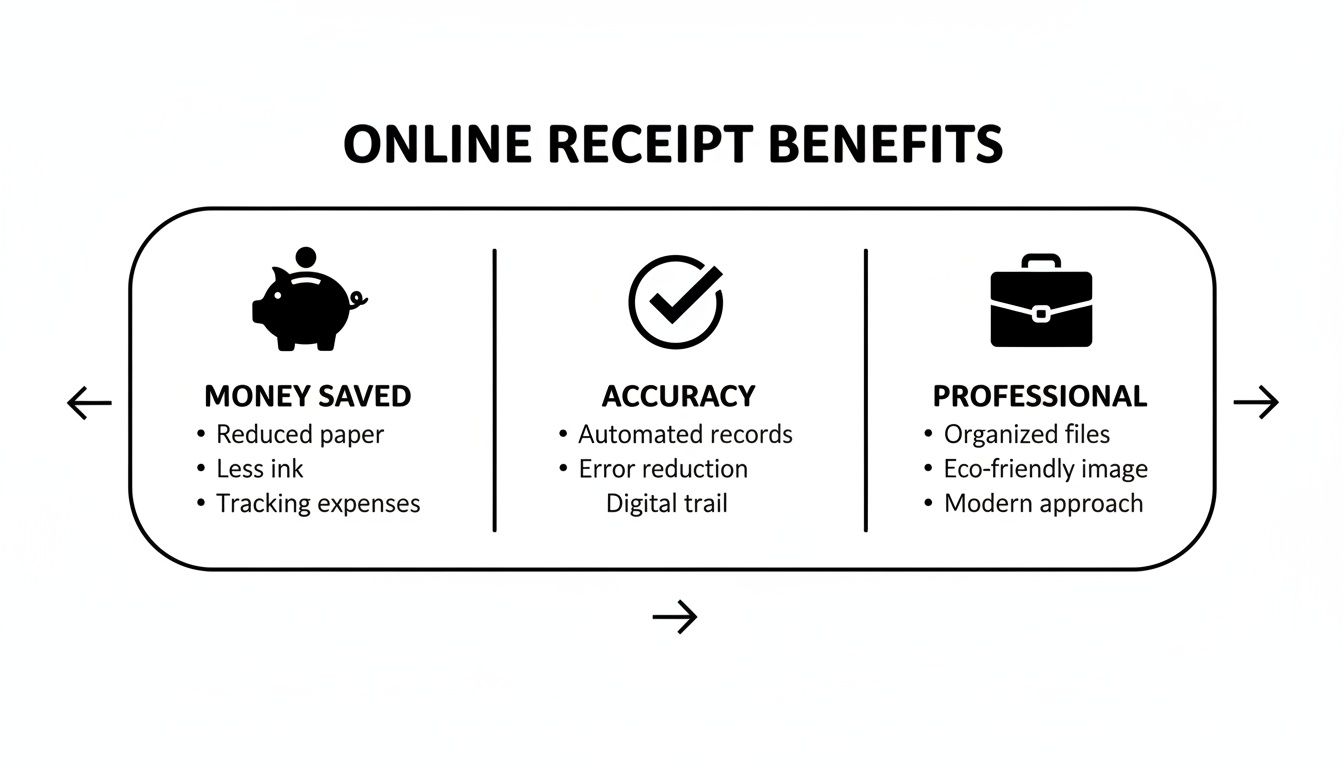
As you can see, the right tools not only save you money but also boost your accuracy and give your business a polished, professional edge.
Comparing Key Template Features
To really narrow down your choice, think about the absolute must-haves for your receipts.
- Do you need to add sales tax?
- Do you accept tips?
- Is there a space required for a customer's signature?
Answering these simple questions will immediately help you filter out the templates that won't work. For example, any decent restaurant template will have a clear line for a tip, while a contractor’s receipt might need a dedicated section to separate material costs from labor charges.
A good template provider will offer a whole range of layouts to cover these common business needs. To see more great options, check out our guide on how to find the perfect free receipt template online.
To help you decide, I've put together a quick comparison table that breaks down common template types and where they shine.
Comparing Receipt Templates by Use Case
| Template Type | Key Fields Included | Best For (Examples) |
|---|---|---|
| Standard Sales | Item Description, Quantity, Unit Price, Subtotal, Tax, Total | Retail stores, e-commerce, general product sales |
| Service/Consulting | Service Description, Hourly Rate, Hours Worked, Subtotal | Freelancers, consultants, repair services, tutors |
| Restaurant/Cafe | Menu Items, Quantity, Price, Subtotal, Tax, Tip, Total | Cafes, restaurants, bars, food trucks |
| Donation/Non-Profit | Donor Name, Donation Amount, Date, Organization's Tax ID (EIN) | Charities, non-profits, fundraising events |
| Rent Receipt | Tenant Name, Property Address, Payment Period, Amount, Payment Method | Landlords, property managers |
| Contractor/Trades | Labor Description, Material Costs, Hours, Rate, Total | Plumbers, electricians, carpenters, construction |
This table should give you a clear starting point. The goal is to find something that feels like it was made just for you—intuitive to fill out and easy for your customers to understand in a single glance.
Pro Tip: Don't just look at the basic fields. Some of the best templates include extra sections for things like your terms and conditions, return policies, or even a small promotional message. Adding these details can protect your business and is a great way to communicate with your customers.
Spending a few extra minutes choosing the right layout now will make every transaction you process from here on out smoother and more professional.
Making the Template Your Own: Customizing for a Professional Look
Once you've found a good online receipt template, the real work begins. A blank template is just a starting point; it's the customization that turns a generic form into a professional document that represents your business well. This is your chance to add the small details that build trust and leave a great impression on your clients.
Before getting into the line items, start with your core business identity. Think of this as the digital letterhead for every transaction you process.
- Your Business Logo: This is your brand's face. A crisp, high-quality logo makes the receipt instantly look official and trustworthy.
- Business Name and Address: Always include your legal business name and a physical or mailing address. This is fundamental for legitimacy.
- Contact Information: Make it easy for customers to get in touch. Add a phone number or email so they can reach out with any questions.
- Tax ID or Business Number: If it applies to you, adding your Tax ID (like an EIN in the U.S.) is crucial for B2B transactions or for clients needing to claim expenses.
Getting the Transaction Details Right
With your branding set, it’s time to focus on the heart of the receipt: the transaction itself. There's no room for error here. The goal is to clearly detail what was bought and sold, leaving no space for confusion or future disputes.
For every product or service, you need to be specific. Fill out each line item with the quantity, a clear description, the price per unit, and let the tool calculate the subtotal. For instance, if you sold three hours of consulting at $75 per hour, the receipt needs to show that exact breakdown—not just a single line item for $225. Transparency builds trust.
A well-detailed receipt prevents follow-up questions and builds client confidence. It demonstrates organization and attention to detail, reinforcing the idea that your business is reliable and professional in every aspect of its operations.
Making sure your tax calculations are spot-on is another critical step. A quality online receipt template free tool will automatically compute sales tax based on the rate you input. Always double-check that you’re using the correct local percentage to stay compliant. For a more detailed walkthrough of this process, our guide on how to create a receipt online has some great tips.
Adding Authentic Touches
To take your receipt from simply "good" to "great," think about adding a few extra details that boost its authenticity. These small additions can completely change how the document is perceived, especially if you're trying to replicate the look of a traditional retail receipt.
Here are a few pro-level customizations I've found make a real difference:
- Choose a Thermal Printer Font: Many receipt makers offer fonts designed to look like they came from a classic thermal printer. This one simple change can give your digital receipt a familiar, authentic feel.
- Add Payment Method Icons: A small icon for Visa, Mastercard, Apple Pay, or whatever method the client used is a nice visual confirmation and adds a layer of professionalism.
- Include a Barcode: Even if it isn't scannable in a digital format, adding a barcode to the design enhances the professional appearance and makes the receipt look more official at a glance.
By taking the time to customize these elements, you're creating more than just a proof of payment. You’re producing a polished, branded document that reflects the quality of your business and builds trust with every transaction.
Getting Your Finished Receipt Out the Door
You’ve tweaked your template and it looks perfect. Now what? The final step is getting that receipt to your customer, and how you save and send it matters just as much as the information on it. Choosing the right format is key to making sure it looks professional on any screen and prints without a hitch.
Most receipt makers give you a few different file types to choose from. Each one is built for a different purpose, so knowing the difference will help you pick the right tool for the job, whether you're emailing a digital copy or handing over a physical one.
Choosing the Right File Format
Think about where this receipt is going. The "best" format really just depends on the situation. There’s no single right answer, but there are definitely better choices for specific tasks.
Here are the usual suspects and when I recommend using them:
- PDF (Portable Document Format): This is my go-to for anything official. A PDF locks in your design—fonts, logos, layout, everything—so it looks exactly the same on your customer’s phone as it does on your computer. It’s the undisputed champion for emailing to clients or for any situation that requires a clean, professional printout.
- PNG (Portable Network Graphics): Need a high-quality image of the receipt? Use a PNG. It keeps text and lines super sharp, which makes it perfect for dropping directly into the body of an email or sending through a messaging app.
- JPEG (Joint Photographic Experts Group): JPEGs are great when file size is your main concern. The quality is a small step down from a PNG, but the smaller file is much easier to send quickly. It’s ideal for informal digital sharing where convenience wins.
My Two Cents: When in doubt, send a PDF. Its universal compatibility and print-ready nature make it the safest and most professional choice for your business records. I save PNGs for more casual, on-the-fly situations.
Printing for That Authentic Look
Sometimes you need a physical copy. Just hitting "print" on a standard 8.5" x 11" sheet of paper can look a bit off, especially if you’re trying to replicate a typical retail or restaurant receipt.
For a truly convincing look, export your PDF to fit an 80mm thermal paper roll. Many of the best online tools have this specific layout option. It creates that familiar long, narrow receipt you’d get from a point-of-sale (POS) system, and that little detail adds a huge amount of credibility.
Digital Delivery and Getting Paid Faster
Sending receipts digitally isn’t just modern—it's a seriously smart move for your bottom line. I heard about an Ohio florist who started emailing digital receipts in 2024 and saw their payment collections triple. That 3x jump came from simply getting a professional, instantly delivered receipt into their customers' inboxes. You can dig into more of the numbers by reviewing the full market analysis.
When you email a PDF receipt straight from the generator, you're not just sending a document; you're creating an immediate, professional paper trail. That prompt delivery keeps the transaction fresh in your client's mind and often gives them the little nudge they need to pay you faster. It’s the easiest way to close the loop on a sale.
Managing and Securing Your Digital Receipts
Once you've crafted your receipt, your work isn't quite finished. What you do next—how you save, store, and secure that digital document—is just as important for protecting your business and your clients' information.
First things first, always stick to platforms that take your privacy seriously. Look for HTTPS encryption in the website address. This is non-negotiable; it's the basic standard that ensures the information you’re plugging into the template is sent over a secure connection.
Your Digital Filing Cabinet: Why an Account Matters
Many receipt generators will let you create a free account, and I strongly recommend you do. Yes, it's tempting to just generate a one-off receipt and move on, but creating an account is like setting up a digital filing cabinet. It lets you save your work, access it from any device, and—crucially—edit it later.
We've all been there: you send something off only to notice a typo or a wrong number. An account lets you go back and fix it without starting from scratch. It’s also your safety net against accidental data loss.
Stay Organized to Avoid Future Headaches
Let's be honest, a folder filled with files named "Receipt_1," "Receipt_final," and "Receipt_final_2" is a nightmare waiting to happen. You can save yourself a world of pain, especially come tax time, by adopting a consistent naming convention right now.
Here are a couple of simple, effective formats I’ve seen work wonders:
- ClientName-InvoiceNum-Date (e.g., SmithCo-1045-2024-10-28.pdf)
- ExpenseType-Vendor-Date (e.g., Supplies-OfficeMart-2024-10-29.pdf)
This simple habit makes your files instantly searchable. And for even more robust organization, we have some expert tips on how to organize receipts for taxes.
Once named, store these files in a secure cloud service like Google Drive or Dropbox. This gives you a reliable backup in case your computer decides to give up the ghost.
A Quick Word on Legitimate Use
It’s critical to remember what these tools are for. They are lifesavers for freelancers who need to recreate a lost receipt for an expense report or for small business owners documenting a quick cash sale. They bring professionalism and order to your record-keeping.
The shift to digital has been huge for small businesses. Consider that manual storage often leads to nearly 30% data loss from misplaced papers alone. Cloud-based tools have become indispensable. By 2025, it's expected that 75% of small and medium-sized businesses will use online tools, a massive leap from just 42% in 2020. You can dig into more insights on how these tools support business recovery on Procol.ai.
However, they should never, ever be used to create false or misleading documents. Using a receipt maker to commit fraud is illegal and comes with severe consequences. Use these tools responsibly to maintain accurate, honest records. Your integrity is your most valuable asset.
Of course, here is the rewritten section.
Common Questions About Free Receipt Templates
Even with the best tools, you're bound to have a few questions. When you’re using an online receipt template free of charge for your business, you want to be sure you're getting everything right. Let's tackle some of the most common things people wonder about.
Getting these details straight will help you use these templates confidently, ensuring your records are both professional and above board. We'll cover the big ones: legality, branding, and what you get for free.
Are Receipts from a Free Online Template Legally Valid?
This is the big one, and the short answer is yes—but with an important catch. A receipt’s legal standing has everything to do with the accuracy of its information, not how it was made. As long as the document truthfully details a real transaction—with the right date, amounts, items, and names—it's perfectly fine for expense claims, bookkeeping, and proof of purchase.
The key here is honesty. These tools are built for legitimate record-keeping. Using a template to create a fake receipt for any kind of fraud is illegal and comes with serious penalties.
Can I Add My Business Logo to a Free Template?
Absolutely, and you definitely should. Adding your logo is probably the most important thing you can do to make a generic template look like your own professional document. Good receipt makers make this incredibly easy; it's usually just a matter of uploading a PNG or JPEG file.
Sticking your logo right at the top instantly adds a layer of authenticity and brand recognition. It’s a small touch that makes a huge difference in how your customers see your business.
Expert Tip: Many free platforms let you customize a lot without signing up. But creating a free account is often a good idea. It lets you save your designs and client info, so you aren't starting from scratch every single time.
What Is the Difference Between Free and Paid Templates?
The real difference comes down to advanced features and how much you use the tool. Free templates almost always cover all the essentials you need for daily operations: solid layouts, basic branding, and the ability to download your receipt. For most freelancers and small businesses, the free version is plenty.
Paid plans usually add on perks for those who need a bit more, like:
- A wider variety of exclusive or industry-specific designs.
- The option to remove the tool's watermark or branding.
- Unlimited cloud storage for all your documents.
- More advanced design control, like custom fonts or brand colors.
Think of the free version as a powerful starting point. The paid plans are there to add extra polish and convenience for businesses as they grow.
Ready to create polished, professional receipts in seconds? Receipt Maker offers over 100 templates for every industry, with all the customization you need to build trust and get paid faster. Get started for free on receiptmakr.com.