How to Make a Fake Receipt for Legitimate Needs
Learn how to make a fake receipt for legitimate uses like expense reports or film props. This guide covers how to create authentic-looking receipts responsibly.
When you need to make a receipt, a digital tool like a receipt maker is your best bet for creating a custom document for legitimate reasons. It's a straightforward process: you pick a template and fill in the details—like the store name, items purchased, and prices—to replicate a lost receipt for an expense report or even to create a prop for a creative project. The golden rule is always to ensure the details accurately reflect a real transaction you actually made.
Why You Might Need to Create a Custom Receipt
Before we get into the "how," let's talk about the "why." The term "fake receipt" can sound a bit dodgy, but there are plenty of completely valid and ethical reasons you'd need to create a custom one. This isn't about pulling a fast one; it’s about good record-keeping and solving practical, everyday problems.
Replacing Lost or Damaged Originals
One of the most common reasons is simply losing the original. We’ve all been there. Maybe you're a freelancer who paid for a client's coffee with cash, only to realize the flimsy thermal receipt vanished somewhere between the cafe and your office. No receipt, no reimbursement.
Or perhaps you’re a small business owner who bought supplies, and the ink on the receipt has faded into a ghostly, illegible smudge. It’s useless for your accountant. In situations like these, the expense was 100% real; recreating the receipt is just about having a proper document for your records. If you find yourself in this spot often, our guide on what to do when you need copies of a receipt has some great pointers.
Creative and Technical Projects
The need for custom receipts goes way beyond just replacing lost ones. They play a surprisingly important role in a few different professional fields.
For example, filmmakers and theater crews constantly need realistic props. A character in a movie can't just say they bought groceries—seeing a believable receipt on the kitchen counter sells the scene.
Software developers and QA testers building accounting or point-of-sale (POS) apps also rely on them. They need tons of sample data to work with. Generating a variety of receipts helps them test if their software can correctly read different layouts, handle tax calculations, and process various items without using anyone's actual, sensitive financial data.
Here's a quick reference guide to understand the appropriate and ethical applications for creating custom receipts across different professional fields.
Legitimate Use Cases for Receipt Makers
| Use Case | Who It's For | Example Scenario |
|---|---|---|
| Expense Reimbursement | Employees, Freelancers | A consultant loses the receipt for a business-related dinner and needs to submit it for their expense report. |
| Personal Budgeting | Individuals, Families | Someone paid for a large cash purchase but didn't get a receipt and wants to add the transaction to their budgeting app. |
| Prop Creation | Film & Theater Productions | A prop master needs a realistic-looking gas station receipt for a character to find in their car during a scene. |
| Software Testing | Developers, QA Engineers | A developer tests their new expense-tracking app by generating receipts with different currencies, tax rates, and formats. |
| Proof of Purchase | Small Business Owners | A market vendor's POS system goes down, so they create a manual receipt for a customer's cash purchase on the spot. |
As you can see, the applications are practical and grounded in real-world needs.
The key takeaway is this: it all comes down to your intent. If you're documenting a real transaction or creating a fictional document for a non-deceptive purpose like a film prop, you’re on solid ethical ground. These tools are for accuracy and creativity, not for committing fraud.
Choosing the Right Template for Your Needs
The secret to creating a believable replacement receipt isn’t about the numbers you plug in—it’s about the digital canvas you start with. A mismatched template is an immediate giveaway. Let’s be real, a receipt from a high-end steakhouse looks completely different from the one you get from a gas pump or your Uber driver. Picking the right base is the most critical first step.
Your mission is to find a template that’s a near-perfect twin to the original transaction. Think back to the lost receipt. Was it a long, itemized bill from a big-box store like Target? Or was it a tiny, simple slip from that corner coffee shop you love? Every type of business uses its own distinct layout.
Matching Templates to Transaction Types
When you’re looking through a library of choices, like the massive collection of receipt templates we offer, resist the urge to just grab the first one that looks good. You have to categorize your lost receipt and hunt down its digital doppelgänger.
- Retail Stores: These templates are workhorses. They usually have spots for a store number, cashier ID, and maybe even a barcode. You’ll almost always see a big logo at the top and neat columns for item descriptions, quantity, and price.
- Restaurants and Cafes: Look for templates built with lines for the subtotal, tax, and a tip. A fine dining receipt will have more room for detailed descriptions (like "Pan-Seared Scallops"), while a cafe receipt is going to be much more straightforward.
- Services (e.g., Parking, Rideshare): These are often sleek and modern. A rideshare receipt template, for example, must have fields for trip details—think start/end locations and trip duration. You'd never see that on a retail slip.
The most convincing replicas start with a template that was designed for that specific kind of transaction. A generic, one-size-fits-all layout just screams fake; specificity is what makes a document look and feel authentic for your records.
This attention to detail is more important than ever. The world of expense reporting is currently battling what’s known as "Fake Receipts 2.0," where incredibly sophisticated fakes can easily fool a quick human glance. This has forced companies to bring in heavy-duty verification tools. In fact, some AI systems are now detecting fraudulent, AI-generated receipts at a rate 18 times higher than older methods. You can read more about how AI is being used to fight fake receipts at Concur.com. This just goes to show why starting with an accurate template for your legitimate recreation is non-negotiable.
When you take the time to select a template that mirrors the industry standard for your transaction, you’re setting yourself up for success. The whole customization process becomes easier, and the final document is far more plausible for whatever legitimate purpose you need it for, be it your personal records or a business expense report.
A Practical Guide to Customizing Your Receipt
Now that you've got the right template, it's time for the real work: making it look like the real deal. This is where you'll transform a blank canvas into a believable record of a transaction. The goal here is precision. You want to mirror the original, lost receipt as closely as you can so it holds up for your records.
Think of it less like filling out a form and more like reconstructing a moment in time. Let’s imagine you need to recreate a lost receipt from a business lunch to get reimbursed. This is a classic scenario, and walking through it will show you how to nail every detail.
Nailing the Vendor Details
First things first, you need to set up the business information. This is the stuff at the top of the receipt—the header—and it's the first thing anyone's eyes will land on. It has to be spot on.
- Store Name and Address: Get the full, correct name and physical address of the restaurant. If you're not 100% sure, a quick Google search will clear it up.
- Logo (Optional but a Game-Changer): If your receipt maker has an upload feature, use it. Adding the restaurant's logo adds a massive layer of authenticity. You can usually find a good quality version with a simple image search.
- Contact Info: Don't forget the phone number or website if they were on the original.
A word of advice: consistency is everything. A receipt from a major chain like Starbucks should look just like every other Starbucks receipt. Clashing fonts or a weird-looking logo is an instant red flag, even if you’re just making a legitimate replacement copy.
Starting with the right template is the foundation for all of this. As you can see below, different businesses need different layouts.
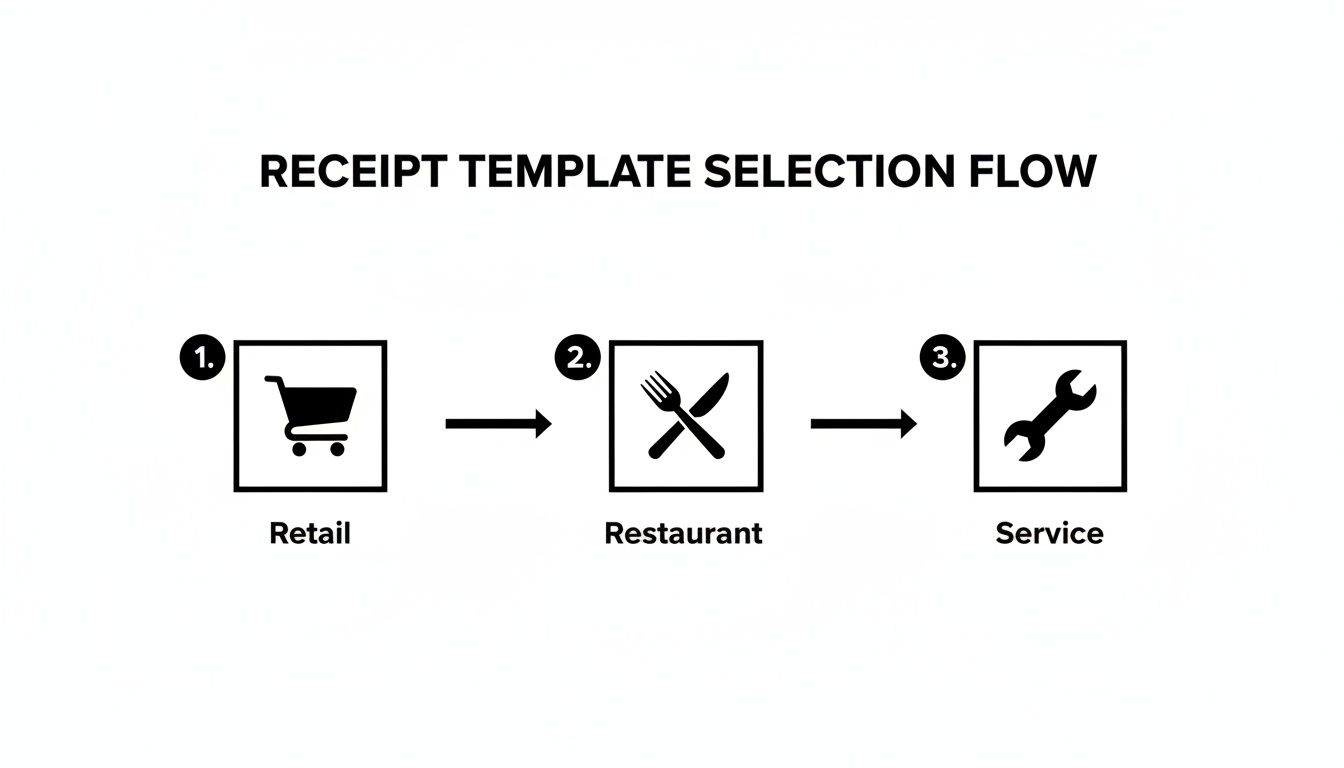
This flow chart really drives home the point. If you pick a restaurant-specific template from the get-go, you'll already have the right fields for things like itemized orders and tips.
Itemizing What Was Purchased
Alright, let's get to the heart of the receipt: the itemized list. This is where you spell out exactly what was bought. Vague descriptions are your enemy here, so get specific.
For our business lunch example, you wouldn't just write "Lunch for two." That's lazy and looks suspicious. Instead, you'd break it down:
- Item Name: "Caesar Salad," "Grilled Salmon," "Iced Tea."
- Quantity: Note how many of each item was ordered (e.g., 2 Iced Teas).
- Price: Enter the exact price for each specific item.
This level of detail creates a transparent, easy-to-understand record of the expense. It’s what makes the document truly useful.
Finalizing the Numbers and Payment Details
The last piece of the puzzle is the math. You need to make sure all the totals add up perfectly and clearly state how the bill was settled. A simple math error is the fastest way to discredit the entire document.
- Subtotal: Most tools will calculate this for you as you add items, which is a nice time-saver.
- Tax: This is a big one. You need to enter the correct local sales tax for that specific location. For our lunch, that means the city and state's restaurant tax rate. Look it up if you have to—guessing is not an option.
- Tip: If you're working on a restaurant bill, add the exact tip you left.
- Total: The final amount should be calculated automatically, but always give it a quick once-over.
- Payment Method: Be specific. Don't just say "Credit Card." Note the type and the last four digits if you can remember them (e.g., Visa **** 1234), or specify if it was cash.
By tackling each section with this kind of focused detail, you can make a fake receipt that serves as a perfect, legitimate replacement for one you've lost. You’ll end up with a professional-looking document that’s ready for any expense report or personal accounting need.
How to Nail the Look and Feel of a Real Receipt
Alright, you've got the basic information plugged in. Now for the fun part—making it look real. This is where we separate a simple digital file from a receipt that genuinely looks like it came from a cash register. These finishing touches are everything when you need a convincing replacement for your expense report or a prop for your film project.
Honestly, the difference between a decent copy and a truly authentic one is all in the tiny details. Getting the formatting right—like text alignment and consistent spacing—is the bare minimum. A messy layout is a dead giveaway.
Picking the Right Font and Paper Style
The font you choose can make or break the illusion. Think about it: most point-of-sale systems don't print in Arial or Times New Roman. To get that genuine look, you need a font that looks like it came from a thermal printer.
Hunt for options that are designed to look like the real thing. They’re often a bit monospaced or even slightly pixelated, which gives the text that classic, machine-printed vibe.
Once the font is set, think about the "paper." A perfect, stark-white background just doesn't feel right for a receipt that's been in a wallet or pocket. Good receipt makers let you add textures and other effects to fix this.
- Paper Textures: A subtle crinkle effect can make a world of difference, giving the impression of actual paper.
- Thermal Effects: Try to mimic that slightly faded, grayish look of ink on thermal paper.
- Folds and Creases: Some of the best tools can even add realistic-looking fold lines for that extra touch of authenticity.
These little tweaks are what elevate your document from just a file to something that feels tangible and believable. You can get a good sense of how different fonts and textures work by browsing our receipt examples.
Why Precision Matters More Than Ever
Getting these details perfect is critical these days. With powerful AI tools becoming more common, so has the ability to create fakes for fraud. This has kicked off a sort of technological arms race in detection. For example, AI-powered analytics can now spot fake receipts with over 90% accuracy, and this tech is getting picked up fast as AI forgeries become more widespread.
For those of us creating receipts for legitimate reasons, this just raises the bar. Our recreations have to be spot-on. Even tiny slip-ups, like a wear pattern that looks too uniform or a missing VAT number, can get flagged by these smart systems.
When you make a fake receipt for an honest purpose, the goal is a perfect replica of a real-world document. Spending that extra time to nail the font, add realistic textures, and double-check every number isn't just for show—it's about making sure your document is accurate and suitable for its intended, ethical use.
Bringing Your Receipt to Life: Exporting and Using It
Alright, you've put in the work and your receipt looks perfect on the screen. Now, let's get it off the computer and into a format you can actually use. This last step—exporting—is more critical than it seems, because the file type you choose really depends on what you need to do with it.
You'll usually see a few options pop up: PNG, JPEG, and the ever-reliable PDF. Think about the final destination for your receipt before you click save.
Picking the Right Format for the Job
If you're just submitting an expense report online or emailing a copy to your accountant, an image file like a PNG or JPEG is often your best bet. They're small, easy to attach, and universally viewable. Simple.
But if you plan on printing it? I always recommend going with a PDF.
PDFs are the gold standard for printing because they lock everything in place—the layout, the fonts, the spacing. What you see on your screen is exactly what you’ll get on paper, which is crucial for a clean, professional-looking copy.
Now, for those who need a receipt that looks like it came straight from a cash register, pay close attention to the paper size settings. Look for an option to format for 80mm thermal paper rolls. This is the standard for most retail point-of-sale systems and will give you that classic, narrow receipt strip. For your own records or standard expense reports, a normal Letter or A4 size is perfectly fine.
Don't Just Create It—Save It
Making one receipt is easy. Making the same receipt over and over for recurring expenses? That gets old fast. If you're a freelancer or run a small business, you know the pain of recreating documents. This is exactly why signing up for an account with your receipt maker is a smart move.
It’s a total game-changer. With an account, you can:
- Save your custom templates: Get your branding, store info, and layout just right, then save it for next time.
- Tweak it later: Need to change a date or an item? Just open your saved template and edit. No more starting from scratch.
- Keep everything organized: You’ll have a neat, digital archive of all the receipts you’ve created.
By saving your work, you're not just making a single document; you're building a system. It ensures that whenever you need to make a fake receipt for a legitimate purpose—like replacing a lost one for your records—you have an editable, professional template ready to go. It's a simple habit that saves a ton of time and keeps your financial records in order.
Drawing the Line: Critical Legal and Ethical Boundaries
Let's get one thing straight: using a tool to make a fake receipt is serious business. It comes with a heavy dose of responsibility. Sure, there are plenty of completely legitimate reasons you might need to create one. Maybe you genuinely lost a receipt for a business lunch and need to recreate it for your expense report. That's one thing. But stepping over the line into outright deception is a whole other world, and it's one filled with serious consequences.
This isn't just some friendly warning. Think of this as your essential guide to staying on the right side of the law.
Handing over a doctored receipt for a purchase you never made or with a padded total isn't a little white lie. It’s fraud. The fallout can be severe, escalating quickly based on who you're deceiving and for how much.
Crucial Takeaway: The second a custom receipt is used to mislead someone for financial gain, it stops being a simple record-keeping tool and becomes an instrument of fraud. And fraud is a crime.
The Real-World Consequences of Misuse
You absolutely have to understand the risks here. If you try to pass off a fake receipt to your employer, an insurance company, or anyone else for reimbursement, the penalties can be steep.
- Job Termination: It’s often an instant firing offense. Most companies have zero tolerance for this.
- Civil Lawsuits: The person or company you tricked can sue you to get their money back, plus extra for damages.
- Criminal Charges: This is where it gets really serious. Depending on the dollar amount, you could face anything from a misdemeanor to a felony charge like wire fraud, which can come with massive fines and even prison time.
This isn't just a theoretical problem. With easy access to AI, the issue is exploding. Software provider AppZen found that AI-generated fake receipts now make up a staggering 14% of all fraudulent documents that employees submit. That number was zero just a year earlier. You can read the full breakdown in this eye-opening report on AI-driven expense scams at FoxBusiness.com.
At the end of the day, receipt makers are built for ethical use cases. Every single reputable service has terms of use that strictly forbid any kind of deceptive or fraudulent activity. Using them responsibly isn't just a good idea—it's the only way to protect yourself from getting into a world of legal and financial trouble.
Got Questions? We've Got Answers
If you're wondering about the ins and outs of creating a replacement receipt, you're in the right place. Let's clear up some of the most common questions people have.
Is It Actually Legal to Make a Receipt?
This is the big one, and the answer comes down to one simple word: intent.
Creating a receipt is perfectly fine for honest purposes. Think about recreating a lost receipt for an expense you genuinely incurred for your expense report, or maybe you need a prop receipt for a short film. It's also a common practice for developers who need sample data to test out their accounting software.
Where you cross the line into illegal fraud is when the intent is to deceive. Forging a receipt for an item you never bought or inflating the price to get more money back is illegal. It’s all about why you're making it.
So, What Are the Legitimate Uses?
Most of the time, people just need a simple replacement for something real. Here are the most common scenarios I see:
- Replacing Lost Receipts: This is number one. You bought a coffee for a client or paid for parking, but the original thermal paper receipt vanished. You need a replacement for your expense report.
- Props for Media: Filmmakers, theater groups, and photographers often need realistic-looking props to make a scene feel authentic.
- Software Testing: Developers building POS or accounting software need tons of sample receipts to make sure their programs work correctly.
- Documenting Cash Sales: If you're a small vendor or freelancer who just made a cash sale, you might need to generate a quick, professional-looking receipt for your customer's records.
How Do I Make My Custom Receipt Look Genuinely Real?
Getting the little details right is what separates a convincing receipt from an obvious fake. It's all about authenticity.
Start by picking a template that actually fits the business. A restaurant receipt looks very different from a big-box retail store's. Then, focus on the small things that sell it. Use a font that mimics a thermal printer, add a subtle paper texture effect to make it look handled, and—this is crucial—double-check that all your math (subtotal, tax, and final total) adds up perfectly. An incorrect calculation is an instant giveaway.
Ready to create an accurate, professional-looking receipt for your records or project? You can jump right in with Receipt Maker for free and see all the customizable templates for yourself.
Head over to https://receiptmakr.com to get started.